iCloud Mail, step by step
- icloud.com, in a browser on a computer
- Meter Matters, the Add bills page
- About five minutes
iCloud Mail forwards with a rule, and needs no confirmation of the address. One rule, then a test.
Make the rule at icloud.com, not in the Mail app on a Mac. A rule made at icloud.com runs on Apple's servers, so it works whichever device you read mail on. A rule made in the Mac's Mail app runs only while that Mac is awake with Mail open.
Make the rule
- On Add bills, press Copy next to your bills address.
- Sign in at icloud.com and open Mail.
- Press the gear at the top of the folder list, then Settings, then Rules.
- Press Add a Rule.
- If a message: choose is from, and paste your utility's sender address. It is the address next to the sender's name on a bill email.
- Then: choose Forward to, and paste your bills address.
- Press Add, then Done.
If gas and electric come from different senders, make a second rule the same way.
Send a test
A rule applies only to mail that arrives from now on. To see it work today, open a recent bill email, press Forward, put your bills address in To, and send. From the Mail app on an iPhone is fine. Within a minute or two, a Filed line appears under What has arrived on Add bills.
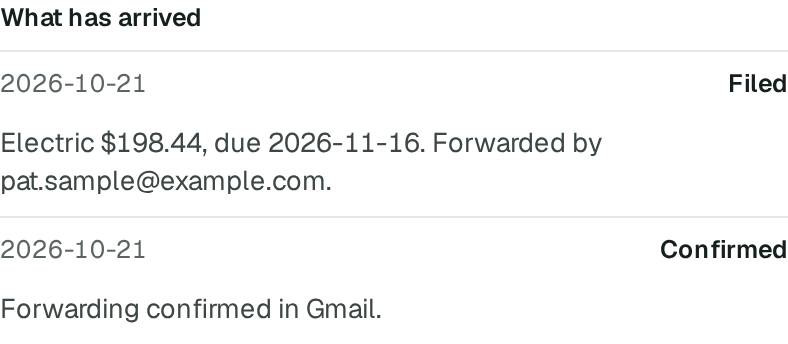
Send the test from the address you signed up with. A forward from any other address is not filed.
If something is off
| What you see | What to do |
|---|---|
| The rule exists, but no bill ever arrives | Rules apply to new mail only; send a test by hand. Check the rule is at icloud.com, not only in the Mac's Mail app. |
| The test says Forwarded by …, who isn't you | Forward from the address you signed up with. An iCloud account can have several addresses; use the one on your Meter Matters account. |
| The log says Couldn't read a bill out of it for something the rule sent | The rule's sender must be the address on the bill email exactly. Utilities use different addresses for bills, payments and offers. |
| I pressed Issue a new address | The old address stopped working. Change the rule's Forward to address to the new one. |
Anything else: the troubleshooting page.